
Track Google Ads and YouTube Leads All the Way to Revenue
Advertising reports show clicks and form fills, but not which campaigns produce customers. To judge Google Ads and YouTube properly you need CRM outcomes tied back to the ad that started them.
Xirgosoft connects Google Ads, including lead form assets and YouTube campaigns, to your CRM. Leads arrive with their campaign and click identifiers, and qualified leads and closed deals are sent back to Google Ads as offline conversions.
We also build reporting dashboards that combine ad spend with pipeline and revenue, so you can see cost per qualified lead and cost per sale, not just cost per click.
The integration works with vTiger, SuiteCRM, SugarCRM, YetiForce, HubSpot, Salesforce, Zoho and custom systems.
Why Ad Platforms Need CRM Data
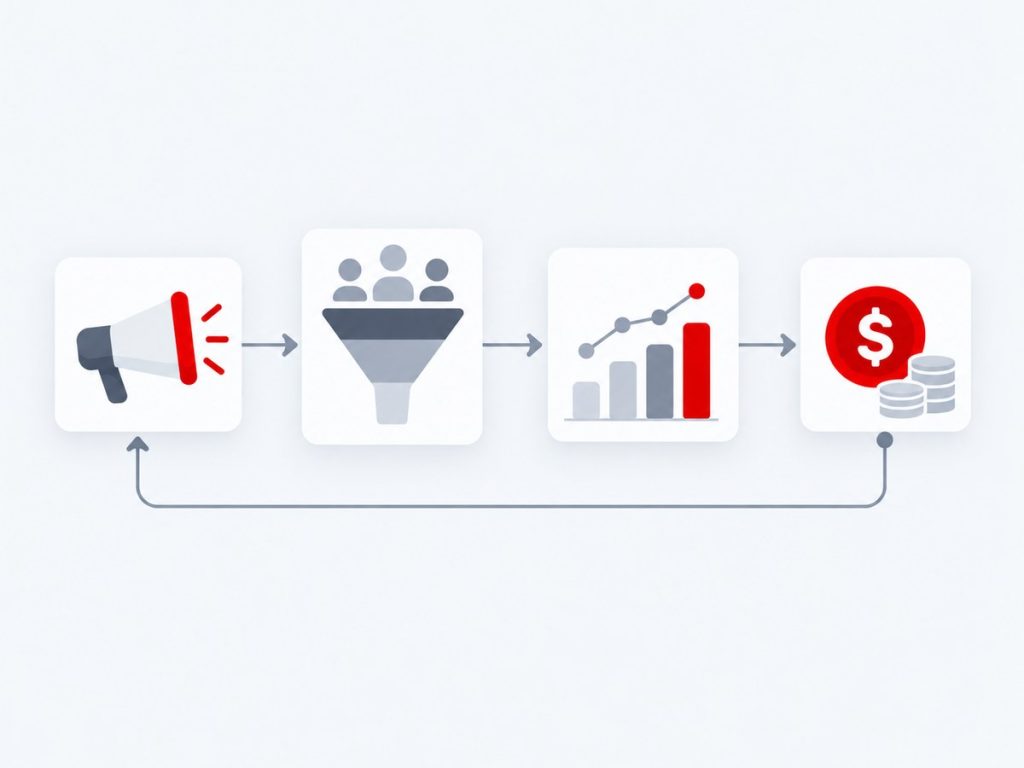
Google Ads optimises for whatever it can measure. If the only conversion it sees is a form submission, it will look for more people who fill in forms, regardless of whether they ever buy. Feeding it real outcomes from the CRM changes what it learns.
This integration connects the whole path: the click and campaign details are captured when the lead is created, stored on the CRM record and later used to report qualified leads and sales back to Google Ads as offline conversions.
The same data powers better reporting. Instead of stopping at cost per click, you can see cost per qualified lead, cost per won deal and revenue by campaign, including YouTube video campaigns that often influence buyers long before they convert.
We design this with privacy and compliance in mind, including consent handling and the hashing and data-use requirements that Google specifies, and we document the set-up so your marketing team can maintain it.
What We Deliver
Everything included in this service, from the first scoping call through to launch and support.
Lead Form Capture
Receive Google Ads lead form submissions in the CRM through webhooks.
Click ID Capture
Store GCLID and campaign parameters from website forms with each lead.
Offline Conversion Upload
Send qualified leads and sales back to Google Ads so bidding learns from real outcomes.
YouTube Campaign Tracking
Attribute leads from YouTube video campaigns using campaign and UTM data.
Cost-to-Revenue Reports
Combine ad spend with CRM pipeline and revenue in a single dashboard.
Consent and Privacy Care
Handle consent, hashing and data-handling rules as Google requires.
Key Benefits
What this means for your business once it is live.
Optimise for Revenue
Ad platforms learn from qualified leads and sales.
True Campaign ROI
Cost per won deal, not just cost per click.
YouTube Visibility
See which video campaigns produce customers.
Aligned Teams
Marketing and sales share one source of truth.
Better Budget Decisions
Move spend to campaigns that actually earn revenue.
Documented Set-Up
Your team can maintain and extend it.
How It Works
Requirements
We define what data moves, when and why.
Connect & Map
We connect systems and map fields.
Test
We test with real scenarios and edge cases.
Launch & Support
We go live and monitor the integration.
Real-World Use Cases
B2B lead quality
Only leads that reach a qualified stage are reported to Google, helping campaigns find similar buyers.
Video campaigns that sell
YouTube campaign leads are tracked to closed deals, showing which videos actually produce customers.
Budget decisions
Marketing sees cost per won deal by campaign and moves budget accordingly.
Sales and marketing alignment
Both teams see the same lead source data in the CRM.
Common Challenges We Solve
Click IDs Lost Between Website and CRM
We capture identifiers on forms and store them with the lead.
Long Sales Cycles
Offline conversions can be reported weeks or months after the click.
Messy Attribution
Consistent UTM and campaign naming makes reports reliable.
Consent Requirements
We implement consent-aware tracking and data handling.
Why Choose Xirgosoft
- Accurate, automatic data flow between systems
- Fewer manual entries and fewer errors
- Tested against real scenarios
- Monitoring and support after launch
Technologies & Platforms
Who This Is For
- B2B companies with long sales cycles
- Businesses running Google Ads or YouTube campaigns
- Marketing teams who need revenue-level reporting
- Agencies managing several advertising accounts
- Companies with a CRM that already holds sales outcomes
What Is Included
- Tracking and form audit
- Click ID and UTM capture
- CRM field and workflow set-up
- Offline conversion upload
- Reporting dashboard
- Documentation and support
Frequently Asked Questions
What are offline conversions?
They are sales or qualified-lead events that happen outside the website, which you upload to Google Ads so it can optimise for real results.
Do we need to change our website forms?
Usually a small change is needed to capture the click ID and campaign parameters with each submission.
Can you track YouTube separately?
Yes. YouTube campaigns can be tracked through campaign and source parameters and reported on their own.
Is this compliant with privacy rules?
We follow Google's requirements for consent and data handling. You remain responsible for your own consent policies, and we help implement them.
Can you build the dashboard?
Yes. We build dashboards in Looker Studio, Power BI or Apache Superset.
How long until Google Ads benefits from the data?
It depends on your conversion volume. Google needs enough conversion data to learn, so higher-volume accounts see effects sooner.
Does this work with Google Analytics 4?
Yes. We can align GA4 events and campaign tags with CRM stages so reports match.
Tie your ad spend to real revenue.
Talk to our experts today for a free consultation and quote.